intelligent Calculator
“intelli-Calc”
How to Use


intelligent Calculator
“intelli-Calc”
How to Use
Ver.1.30


Contents
How to
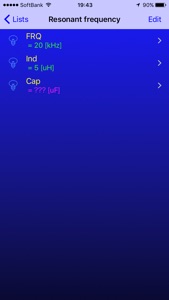
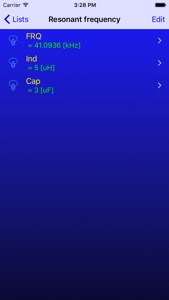
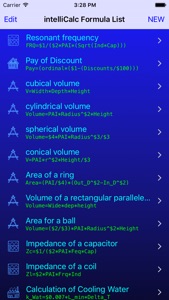
例として、ここでは共振周波数を求める式”Resonant frequency”を使ってみます。
式を選択すると、式を構成している変数の一覧を表示します。
選択した時はその前に入力された数値が残っています。
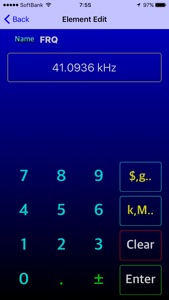
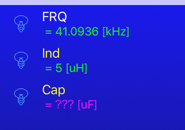
FRQ = 41.0936[kHz](共振周波数の答え)
ind = 5[uH](インダクタンス 5μH)
Cap = 3[uF](静電容量 3uF)(キャパシタンス)
つまりインダクタンスが5μHで静電容量3μFの時
共振周波数は41.09kHzと計算されています。
この式を使って周波数(FRQ)が20kHzになるように静電容量(Cap)を変えてみたいと思います。
As an example, here is try to use the expression "Resonant frequency" to find the resonance frequency.
When you select the expression and displays a list of the variables that make up the formula.
When you choose there are still number entered into before that.
FRQ = 41.0936 [kHz] (the answer to the resonance frequency)
ind = 5 [uH] (inductance 5μH)
Cap = 3 [uF] (capacitance 3uF)
When the electrostatic capacity 3μF in other words inductance 5μH
Resonance frequency has been calculated to be 41.09kHz.
Frequency using this expression I would like to change the capacitance so as to 20kHz.
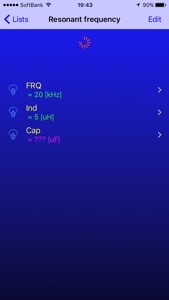
変数の一覧画面で画面をプルダウンすると逆算計算を開始します。
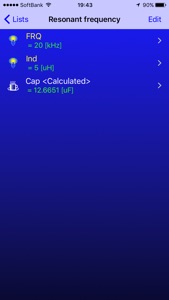
周波数が20kHzでインダクタンスは5μHの時静電容量は12.6651μFと算出されました。
全ての変数がある場合は答えの項を、変数に空欄(???)がある場合は変数を再計算します。
← 先ほど消した”Cap”の値が再計算されました。
コーヒーカップのアイコンの項です。
計算が行われると電球のアイコンは点灯になり
再計算された結果はコーヒーカップのアイコンで示されます。
起動すると
登録された式の一覧表を表示します。
Start and
It will display the Formula list that have been registered.
Start the inverse operation calculated to pull down the screen in the list screen of the variable.
Frequency inductance at 20kHz is the electrostatic capacity when the 5μH was calculated to be 12.6651μF.
The answer of the term if there is all of the variables, if there is a blank (???) to a variable and then re-calculate the variable.
← the value of the erased earlier "Cap" has been re-calculated.
This section of the coffee cup icon.
When calculation is performed bulb icon remains illuminated
A result of the re-calculation is indicated by the icon of a coffee cup.


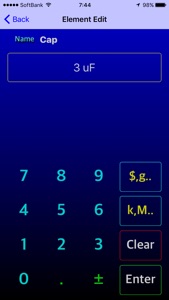
“Cap”の項をタッチするとElement Edit画面に移行します。
When you touch a section of the "Cap" to migrate to the Element Edit screen.
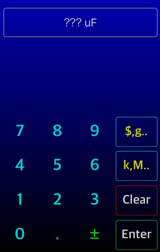
“Clear”タッチすると消去します。
これでCapの項の数値を消去出来ました。→ ???uFに成ります。
“Enter”で前画面に戻ります。
*画面のスライドでも戻ることが出来ます。
"Value Clear" Touch of Value place will be erased.
This was able to erase the numerical value of the Cap of the term.
To return to the previous screen with the "Enter".
* You can also go back to the screen slide.


変数一覧の画面に戻ると
Capの項が”???”になりました。
*??? 何もないという意味
When you return to the screen of the variable list
Section of the Cap is now "???".
* Meaning that ??? is nothing




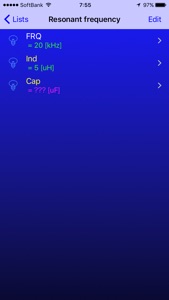
変数表示画面で”FRQ”の項をタッチし変数 FRQ(周波数)の項を変更します。
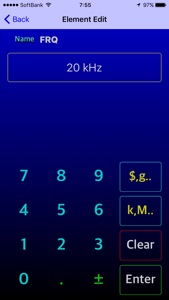
目的の周波数が20kHzなので”20”をテンキーから入力します。
“Enter”で確定すると一覧画面に戻りFRQの項が20kHzに変更されています。
周波数20kHzでインダクタンス5uHの時のCap(静電容量)を計算する準備が出来ました。
変数一覧画面ではまだ計算されていないので電球のアイコンは消灯になっています。
Change the section section of touch and variable FRQ (frequency) of "FRQ" in the variable display screen.
Frequency of purpose Enter the 20kHz so "20" from the numeric keypad.
"Enter" FRQ section Returning to the confirmed list screen has been changed to 20kHz.
Since the variable list screen has not been calculated yet have light bulb icon turned off.
2)次にFRQ(周波数)の項を変更します。
and then change the terms of FRQ (frequency).


3)次に再計算を実行します。
Run the next re-calculation.
1)まずはCap(静電容量)の項を変更します。
First, to change the term of Cap (capacitance).